Transaction States
Every transaction in wallee moves through a defined set of states, from creation to a final state. Understanding these states is essential for tracking and managing payments: they tell you the current status of a payment, let your system react to every step of the payment process, and help you address issues promptly.
State overview
A transaction progresses through various states. Figure 1 shows the possible states and the permitted transitions between them.
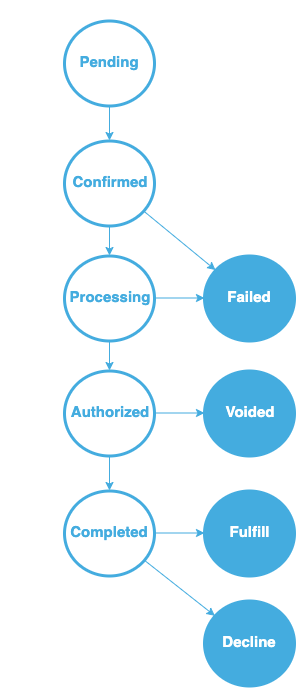
Figure 1: The transaction states including the state transitions
We guarantee that every transaction uses these states, regardless of the payment method or processor. However, some states might be bypassed, and the timing may vary depending on the specific payment method and on how the transaction is processed.
| State | Meaning | Final state |
|---|---|---|
Pending | Transaction created and still editable | No |
Confirmed | Transaction locked, ready for processing | No |
Processing | Payment is being processed | No |
Failed | Payment could not be authorized | Yes |
Authorized | Funds are reserved | No |
Voided | Authorization cancelled before completion | Yes |
Completed | Transfer of the money has begun | No |
Fulfill | Order can be fulfilled | Yes |
Decline | Order must not be fulfilled | Yes |
We recommend integrating all of these states into your application, including their timing. This ensures that your integration supports every payment method. To be notified whenever a transaction changes its state, subscribe to webhooks instead of polling the API.
The following sections describe each state in detail, its significance and when it is applied within the payment process.
Pending
When a merchant creates a transaction, it enters the Pending state. In this state most properties can still be modified, and the amount can be increased or decreased until the transaction transitions to the Confirmed state.
How long a transaction stays in Pending is controlled by your application. The transition to the Confirmed state can be initiated via the web service API.
Confirmed
Once a transaction is Confirmed, it cannot be changed anymore — transaction processing can begin. A transaction may remain in the Confirmed state without transitioning to Processing as long as the customer has not been redirected to our service.
How long a transaction stays in this state is determined by your application. The state changes to Processing once the customer is redirected to our platform.
Processing
The Processing state is active while transaction processing has begun but is not yet complete. A transaction may remain in Processing for seconds or several weeks, depending on the payment method, the process flow, the charge flow used and how the transaction is processed.
Failed
The transaction enters the Failed state when the payment cannot be authorized. This may happen when the customer cancels the authorization process or when the processor declines the authorization. Detailed reasons for the failure can be found in the charge attempts linked to the transaction. Customers may retry several times, with a different failure reason each time.
Failed is a final state — the transaction will not change its state anymore.
To view detailed information about why the transaction failed, open the transaction by navigating to Space > Transaction in your PostFinance Checkout.
Authorized
A transaction is Authorized when the customer has agreed to the transaction and the system has confirmed their ability to pay the specified amount. Authorized means the funds are reserved — they have not yet been transferred from the customer's account to the merchant's account.
In the Authorized state, you can still adjust the transaction amount by changing line items, either through the API or in the portal. How long a transaction stays in this state is controlled by you. Once no further changes are needed, complete the transaction via the web service API or in the portal.
Some payment methods do not support reserving funds. These transactions skip the Authorized state and proceed directly to the Completed state.
Voided
A transaction reaches the Voided state when an Authorized transaction is cancelled before completion and will not be processed further. Transactions can be voided in the portal or via the web service API.
Voided is a final state — the transaction will not change its state anymore.
Completed
When a transaction enters the Completed state, the transfer of the money from the customer's account to the merchant's account has begun. The amount can no longer be changed. However, Completed does not mean that goods or services can be delivered immediately: depending on the payment method, the funds may need to be fully transferred before delivery can occur — for example in pre-payment scenarios.
Example: When you offer online banking as a payment method in your shop, the transaction reaches the Completed state as soon as the customer completes the payment. Depending on the payment method, it may take up to one day until the provider confirms that the funds have arrived in your account. The transaction remains in the Completed state until this confirmation is received.
If there is no automatic process that notifies us when the funds have arrived or are guaranteed by a third party, you need to verify manually that the payment has been received and then transition the transaction to either the Fulfill or the Decline state.
Fulfill
When the transaction enters the Fulfill state, you may begin processing the order. For physical goods, this means initiating the delivery process.
Fulfill is a final state — the transaction will not change its state anymore.
Decline
When a transaction transitions to the Decline state, you must not fulfill the order. A transaction is typically declined when the customer refuses payment or when there is a high risk of a chargeback, often due to suspicious activity flagged by your fraud prevention settings.
Decline is a final state — the transaction will not change its state anymore.
Once this state is reached, an automatic refund can be triggered, ensuring accurate accounting and a prompt refund. Use this feature with caution. To activate it, navigate to the transaction settings of your space in your PostFinance Checkout.
Actions on a transaction
Besides the state transitions themselves, three actions change what happens to the money. Which of them is available depends on the state the transaction is currently in:
| Action | Possible in state | Effect |
|---|---|---|
| Completion | Authorized | Finalizes the payment and starts the transfer of the money. Only one completion per transaction is possible; the line items can be changed up to that point. |
| Void | Authorized | Cancels the authorization and releases the reserved funds. The transaction becomes Voided. |
| Refund | Completed or Fulfill | Returns money to the customer after the payment was processed. See Refunds. |
Related topics
- Authorisation Response — how the authorization result is communicated, including all response codes.
- Delivery Indications — deciding whether an order may be fulfilled.
- Refunds — returning money to the customer after a transaction.
- PCI DSS — how card data is protected throughout the process.